Once and again I try the Nightly version of Mozilla Firefox.
Today I noticed that the Mobile version of Firefox has WebRTC support. Woot!?
That means you can go into about:config and set
media.peerconnection.enabled
to true.
If you've got a second mobile device or download the nightly desktop version (and enable peerconnection there too).
Then you can visit the webrtc reference application with the first device, and enter the given URL (at the bottom) on the second device to join the session.
E voilà you've got a working WebRTC (with video and audio) connection between your two devices.
Or even conversat.io ! Yes - use conversat.io - looks promissing. Maybe even for team (ovirt) meetings?
My focus over the last year or so lay on bringing test automation to oVirt Node.
It was challenging because oVirt Node is based on a LiveCD - at boot and post-installtion. (The whole LiveCD is used as a r/o rootfs.)
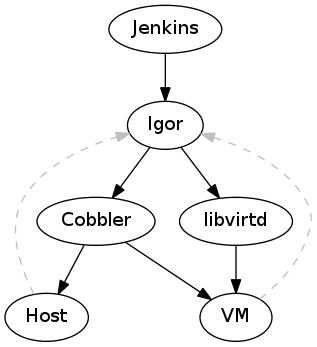
To allow an automated testing of oVirt Node, I've been working on igor. It allows us to test oVirt Node on real hardware an in VMs.
When you throw all the new features (see below - libvirt-only, new igorc, new igor events service, junit-reports for jobs) together you can do a complete testsuite run on an oVirt Node ISO with one command.
And this is how it looks (view it in fullscreen to see all the nifty details, but this will leave you without the subtitles explaining what's happening):
0
00:00:00,000 --> 00:00:00,100
1
00:00:00,100 --> 00:00:03,000
Launching igorc
2
00:00:03,000 --> 00:00:12,000
igorc (left) extracts LiveCD, creates a profile and submits a new job
3
00:00:27,000 --> 00:00:32,000
igord created a VM (right) and boots it up (from a CD derived from the igord profile)
4
00:00:40,000 --> 00:01:00,000
VM (right) boots and the autoinstall is performed
5
00:01:36,000 --> 00:01:45,000
Installation finished (Ctrl-Alt-Del is sent to the VM to reboot [that's a known bug])
6
00:01:58,000 --> 00:02:05,000
The VM now boots from HD
7
00:02:20,000 --> 00:02:27,000
An igor-service is now started in the background (within the VM) to communicate with igord
8
00:02:34,000 --> 00:02:39,000
The igor-service tells igord about the ocmpletion of the first testcase, which is then picked up by igorc (left).
9
00:02:39,000 --> 00:02:45,000
A couple of more testcases were completed (left) and a reboot is initiated (by the igor-service within the VM)
10
00:02:48,000 --> 00:03:10,000
The VM (right) reboots
11
00:03:46,000 --> 00:03:59,000
All testcases passed and the VM is torn down by igord
This is a big step forward - even if there are still some issues outstanding to achieve the goal to make testcase development fun.
Now that we've seen the fancy part some background and open issues.
One pitfall - up to this week - was the hurdle to get igor up an
running. Igor used to require Cobbler - and cobbler is not easy to setup
on Fedora 18 (which I use to build an test oVirt Node - which itself is
based on Fedora 18 packages).
Anyhow - long story
short - Igor has a "feature complete" "backend" for libvirt now, that
means, igor doesn't need cobbler anymore. Furthermore I've added a brand
new igor client (called igorc) which communicates with igord (the
daemon doing all the coordination work).
This client has some
"advanced" features like pretty printing of junit results (Igor offers
the result of the testruns in junit's XML format).
Some open issues:
ovirt-node needs a target to build a testable ISO
igor needs a feature to upload testsuites from the client side
All of this is up in the igor repository. ovirt-node related patches (e.g. merging of the igor plugin are pending). Just follow the node-devel ml to see when is is ready for daily usage.
That's it for now - thanks for watching.
There was this issue where oVirt Node wouldn't restart after an auto-install. systemd got blocked by something. These twolinks helped me debugging this issue.
Node 2.6.1- a very slim firmware-like Fedora for oVirt Node - has been released.
This minor release was necessary because our major TUI rework introduced a security hole. Get it here.
So whats new about Node 2.6.x?
Well, we've got plugins and a new TUI (a new installer TUI will follow shortly).
More can be found in the release notes.
And whats coming up?
It obvious that a "solid core" or this "firmware like" properties of Node are well suited for other projects as well (think of OpenStack, Gluster, ...)
So a near term goal is to dro the oVirt specific bits (like vdsm) to make Node more general and easier to use for other projects.
And the new installer shall also land.
Working on oVirt Node is nice, this minimal, firmware like, rock-solid, (non-official) Fedora "spin", is oVirts "hypervisor".
One challenge is to keep Node rock-solid.
Typically you can add unit tests to your software to shield yourself from regressions (or at least discover them early) but adding tests to Node wasn't that easy as Node is a complete "operating system" and not just one component. It is currently composed of approximately 450 packages - all of these change independetly.
We were looking for a way to automate some basic tests on development or released images. But a requirement to run the tests is a running Node. This means testing requires an installation (and subsequent a removal or "freeing" of th eused host) on different hardware, including virtual machines.
So we needed a tool that could control the whole life-cycle (provision, run tests, and freeing) of a machine (either real or virtual) and which is also monitoring the progress of a testsuite, to act accordingly (e.g. killing it if it times out).
We did not find such a tool and came up with igor.
Igor expects a working PXE environment (so a lan with some DHCP and PXE server like Cobbler) and some hosts or a libvirtd instance. It is expected that all hosts (real and virtual) boot via PXE from the PXE server.
In such an environemtn Igor can control the PXE server to modify the configuration for existing hosts (or add configuration for short-living hosts like a VM) to install an oVirt Node image.
After changing the PXE configuration and booting up the host Igor steps back and either waits for a controlled ending of the testsuite (signaled via a RESTlike API) or a timeout. When it receives such a signal it shuts down the host and restores the original PXE configuration.
So that's a first build-block of how we automated the testing of oVirt Node. I haven't gone into detail how the testcases look like and how we are actually testing our TUI. Also I didn't mention the client which is running on (an edited) oVirt Node image tu actually run the tests.
Igor can be found here and is intended to be used on a developers machine (or in conjuction with jenkins).
p.s.: It is getting interesting when Igor is paired with a client using python-uinput to inject mouse and keyboard events.
There is currently working going on on bringing CI testing to oVirt Node - our smallish Fedora based "hypervisor".
Enabling automated testing is quite a challenge, because Node is not using anaconda/kickstart for installation, works with a read-only rootfs and uses a snack/newt based TUI. Many existing automated testing solutions have problems with some these aspects - because they rely on kickstart or on ATK.
Anyhow, the testcases which are run on Node are typically written in bash or python. There are a couple of common functions that are needed in both languages (e.g. to communicate with the testing server or providing a common logging function).
It's quite error prone to have functions in both languages providing the same functionality, and that was the point where I looked for a method to automatically or "natively" call python functions from bash (not calling bash from python).
Searching didn't lead to any good alternative, therefor I've come up with the this bash snippet which creates bash functions for all callables of a given python module.
This might not be perfet, but it does the job in our case.
The TUI testing - while we are at it - is now done using uinput.
Installing hosts using PXE is a well known thing.
Why not do it within libvirt? Or: How do I do this in libvirt?
Do I need to setup my own dhcp server to pass the bootp option? Nope.
Just use libvirts default dnsmasq and add the bootp dhcp option.
All you need to do is editing the default network configuration using virsh (no way o do it from virt-manager).
# virsh net-destroy default
# virsh net-edit
  Now add "<bootp file='/pxelinux.0' server='$PXESERVERIP' />" under /network/ip/dhcp
# virsh net-start default
All done.
Just have a look at the definition here to read about more features.
Virtualization is already an ubiquitous technique.
Fedora provides packages for many of the Linux virtualization components through the yum virtualization group.
$ sudo yum groupinstall virtualization
Well, anyway - When doing virtualization you need a host, hosting your virtualized guests. If you don't want to do this on your local machine - because it hasn't got the capabilities, isn't beefy enough, ... - you can use oVirt Node as a hypervisor on a second machine which you can easily manage from Fedora using virt-manager.
This can be useful for a small working group or developers.
oVirt Node is based on Fedora and optimized to quickly get a hypervisor up an running. You actually do not need to care about all the constraints - networking, services, storage, ... - you need to consider if you setup a hypervisor yourself (which can also be done with Fedora). It is also stripped down (~150MB) to preserve most of the RAM and storage space to the virtualized guests.
Install it on a machine with a recent Intel or AMD processor
Log into the installed Node using admin and
Configure a network interface
Press F2 to drop to the console and run
/usr/libexec/ovirt-config-password
set a root password
enable SSH access
Optional: ssh-copy-id your ssh key to node to allow a password-less login
User virt-manager to create a new connection (File -> New Connection) to the installed Node (IP can be found on the Node's Status page) URI: qemu+ssh://$OVIRTNODE/system
($OVIRTNODE needs to replaced accordingly)
Actually oVirt Node is intended to be used with oVirt Engine, which can manage from one up to a couple of hundreds (?) of Nodes.
But the Engine setup itself is not as easy as just using virt-manager :)
At least - Engine would be the next step to get used to the oVirt components.
P.s.: You can use virsh vol-upload to get some data onto the node.
oVirt - maybe you've heard about it. It's a project to create an open IaaS "virtualization management system" - So a bit like OpenStack, but different.
Fedora is the base for oVirt's hypervisor: "Node". Basicaly this is a stripped down Fedora, enriched with a couple of packages to prvide just enough to host some virtual guests and do some basic configuration.
Personally I'd like to use Node in conjunction with Gnome Boxes or virt-manager. But this is currently not possible - but we might get closer to it when solving this bug.
Anyhow, to quickly install oVirt Node you just need to add two (or three) additional kernel arguments:
BOOTIF=ethX storage_init
You should/could also add
adminpw=$ADMINPW
ADMINPW=$(openssl passwd -salt SALT) is a salted password, so you can log in (as admin) after the installation. Alternatively you can boot into single mode to reset the password.
The parameters above install oVirt node without user intervention, setup networking on ethX and erase all data on the disk and create a defautl (lvm based) partitioning scheme.
The next step would be adding Node to oVirt Engine - or wait until it can be managed by virt-manager, which is much quicker to set-up :)