Friday, March 1, 2013

oVirt Node 2.6.1

Pope Benedict XVI  in Castel Gandolfo

Node 2.6.1- a very slim firmware-like Fedora for oVirt Node - has been released.
This minor release was necessary because our major TUI rework introduced a security hole. Get it here.

So whats new about Node 2.6.x?
Well, we've got plugins and a new TUI (a new installer TUI will follow shortly).
More can be found in the release notes.

And whats coming up?
It obvious that a "solid core" or this "firmware like"  properties of Node are well suited for other projects as well (think of OpenStack, Gluster, ...)
So a near term goal is to dro the oVirt specific bits (like vdsm) to make Node more general and easier to use for other projects.
And the new installer shall also land.

Friday, January 25, 2013

Nothing new, just GNOME 3

GNOME 3 is my favorite DE.
I really appreciate how much works has gone into GNOME. Into the UI and below the surface. Seen from my perspective GNOME - as on Fedora - turns into the best system-integrated DE. The control-center can actually be used to control system stuff - thanks to all the changes that happened below, within cups, systemd, pulseaudio, colord, ... To me Fedora feels more like one system, and not several layered components.
Sure, the changes were disruptive and not every one is happy with the results - but that's just normal. And I wonder about all this ranting and bashing on changes.
In the case of GNOME it's also nice and somewhat refreshing to see that there is a plan - a vision - of where to go and what to form.

Thursday, November 22, 2012

Igor - Testing an OS on real and virtual hardware

Igor Mitoraj nella Valle dei templi

Working on oVirt Node is nice, this minimal, firmware like, rock-solid, (non-official) Fedora "spin", is oVirts "hypervisor".

One challenge is to keep Node rock-solid.
Typically you can add unit tests to your software to shield yourself from regressions (or at least discover them early) but adding tests to Node wasn't that easy as Node is a complete "operating system" and not just one component. It is currently composed of approximately 450 packages - all of these change independetly.

We were looking for a way to automate some basic tests on development or released images. But a requirement to run the tests is a running Node. This means testing requires an installation (and subsequent a removal or "freeing" of th eused host) on different hardware, including virtual machines.
So we needed a tool that could control the whole life-cycle (provision, run tests, and freeing) of a machine (either real or virtual) and which is also monitoring the progress of a testsuite, to act accordingly (e.g. killing it if it times out).
We did not find such a tool and came up with igor.


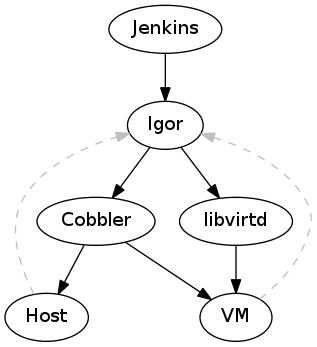
Igor expects a working PXE environment (so a lan with some DHCP and PXE server like Cobbler) and some hosts or a libvirtd instance. It is expected that all hosts (real and virtual) boot via PXE from the PXE server.


In such an environemtn Igor can control the PXE server to modify the configuration for existing hosts (or add configuration for short-living hosts like a VM) to install an oVirt Node image.
After changing the PXE configuration and booting up the host Igor steps back and either waits for a controlled ending of the testsuite (signaled via a RESTlike API) or a timeout. When it receives such a signal it shuts down the host and restores the original PXE configuration.

So that's a first build-block of how we automated the testing of oVirt Node. I haven't gone into detail how the testcases look like and how we are actually testing our TUI. Also I didn't mention the client which is running on (an edited) oVirt Node image tu actually run the tests.

Igor can be found here and is intended to be used on a developers machine (or in conjuction with jenkins).

p.s.: It is getting interesting when Igor is paired with a client using python-uinput to inject mouse and keyboard events.

Thursday, October 18, 2012

bobthegnome, gcalctool and vala


gcalctool is the friendly calculater in GNOME. And now - after several others (at least cheese, zeitgeist, gnome-games)- it is ported to vala! Wow.

This didn't happen out of the blue, it was someone actually doing it - bobthegnome and PioneerAxon made this happen.
What does this mean? gcalctool should be easier to maintain and maybe attract even more contributors, as you don't have to deal with the whole boilerplate. And - Vala is gaining momentum. Nice. Cheers.

Thursday, September 13, 2012

Opus now/soon in gstreamer-plugins-bad-free


Opus is a new audio codec covering a wide range of use cases. You can read more about the codec (at least) here and here.

If you want to get started with it, just try a freshly rebuild gstreamer-plugins-bad-free package which packages the opus plugin.
You will be able to use the en- and decoders in your normal gst pipeline.

It should soon land as an update on Fedora near you.

[Update]
The update has landed in updates testing:
su -c 'yum update --enablerepo=updates-testing gstreamer-plugins-bad-free-0.10.23-11.fc18'

Saturday, September 8, 2012

Easier streaming with presence-0.4.8


Presence is a small - but yet flexible - tool to do simple and high-quality streaming (using dirac+vorbis over RTP) in a local broadcast domain.
When not using the MDNS feature this can also be endpoints on any routable network.
Not shown on in the screen shot, but a feature, is picture-in-picture mode for secondary streams.

Anyhow, this new release (0.4.8) contains an improvement related to publishing a stream. It's now done in two clicks with reasonable defaults, even for low-end machines.

Install or update it now on Fedora 16/17/18:
$ sudo yum clean metadata
$ sudo yum install --enablerepo=updates-testing presence
# or
$ sudo yum update --enablerepo=updates-testing presence

Or - hero-like -using this one-click technology.

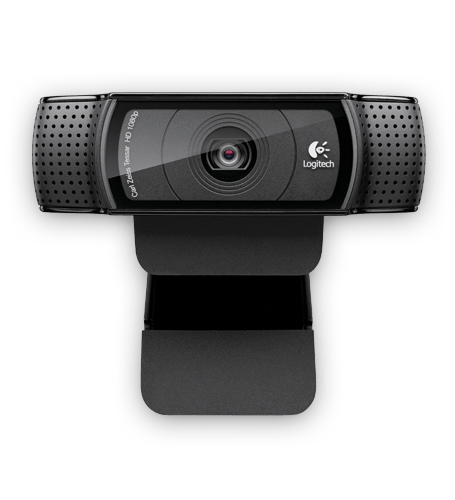
The release was motivated by my new Logitech HD Pro Webcam C920 which is working out of the box on Fedora - so YUV and MJPEG besides the (unsupported) h.264 support.
When looking at the video quality of this camera and two built-in cameras of laptops, this is clearly a big step forward in image quality - So a decent camera is always a good way to improve a video conference.
As said, the video quality is great - and using MJPEG it can deliver a 720p video with up to 24fps, so ideal for telepresence. 

Monday, September 3, 2012

Screenshotting /dev/vcs

If you ever wanted to know how to take a "screenshot" of a VCS (where your login prompt is displayed) you can use the following snippet:
cat ../tests/igor/libs/common/vcs.py 
#!/bin/env python
#
# bash only:
# su -c 'cat /dev/vcs3 | fold -w $(stty size | cut -d " " -f 2) > /tmp/term'
#


import Image, ImageDraw
import subprocess
import argparse
import sys


def execute(cmd):
    proc = subprocess.Popen(cmd, shell=True, \
                            stdout=subprocess.PIPE, \
                            stderr=subprocess.STDOUT)
    (stdout, stderr) = proc.communicate()
    proc.wait()
    return str(stdout)

def get_size_of_tty(n):
    """Return the number of rows and cols of tty n
    """
    cmd = "stty -F /dev/tty%d size" % n
    rows, cols = execute(cmd).split(" ")
    return (int(rows), int(cols))

def capture_vcs(n, fold_at):
    """Return the contents of vcs n
    Thsi can also be used with (bash) fold -w
    """
    tty = "/dev/vcs%d" % n
    cmd = "cat %s | fold -w %d" % (tty, fold_at)
    return execute(cmd)

def image_from_vcs(n, stridex=6, stridey=12):
    """Create an image from vcs n
    """
    height, width = get_size_of_tty(n)
    im = Image.new(Image.MODES[6], (width * stridex, height * stridey))
    draw = ImageDraw.Draw(im)
    nl = 0
    screen = capture_vcs(n, fold_at=width)
    for line in screen.split("\n"):
        draw.text((0, stridey * nl), line)
        nl += 1
    return im

def screenshot_from_vcs(n, filename, format="png"):
    """Create a screenshot of a vcs and write it to a file
    """
    im = image_from_vcs(args.vcs)
    im.save(open(filename, "wb"), format.upper())

if __name__ == '__main__':
    parser = argparse.ArgumentParser(description='Create a screenshot from ' +
                                                 'a console.')
    parser.add_argument('vcs', type=int,
                        help='The VCS/TTY to be captured')
    parser.add_argument('--format', metavar='t', type=str,
                        choices=['png'], default="png",
                        help='The image format')
    parser.add_argument('file', metavar='dst', type=str,
                        help='The destination file')
    args = parser.parse_args()
    screenshot_from_vcs(args.file, args.format.upper())
The images can be used to create a screen capture of your console.