Showing posts with label node. Show all posts

Thursday, April 25, 2013

Testing oVirt Node in 4min (video)


My focus over the last year or so lay on bringing test automation to oVirt Node.
It was challenging because oVirt Node is based on a LiveCD - at boot and post-installtion. (The whole LiveCD is used as a r/o rootfs.)

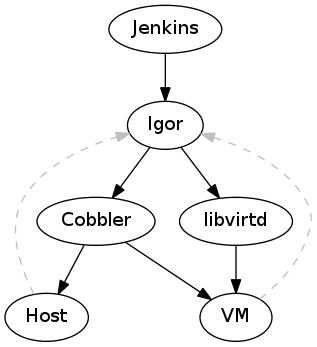
To allow an automated testing of oVirt Node, I've been working on igor. It allows us to test oVirt Node on real hardware an in VMs.

When you throw all the new features (see below - libvirt-only, new igorc, new igor events service, junit-reports for jobs) together you can do a complete testsuite run on an oVirt Node ISO with one command.

And this is how it looks (view it in fullscreen to see all the nifty details, but this will leave you without the subtitles explaining what's happening):


0 00:00:00,000 --> 00:00:00,100 1 00:00:00,100 --> 00:00:03,000 Launching igorc 2 00:00:03,000 --> 00:00:12,000 igorc (left) extracts LiveCD, creates a profile and submits a new job 3 00:00:27,000 --> 00:00:32,000 igord created a VM (right) and boots it up (from a CD derived from the igord profile) 4 00:00:40,000 --> 00:01:00,000 VM (right) boots and the autoinstall is performed 5 00:01:36,000 --> 00:01:45,000 Installation finished (Ctrl-Alt-Del is sent to the VM to reboot [that's a known bug]) 6 00:01:58,000 --> 00:02:05,000 The VM now boots from HD 7 00:02:20,000 --> 00:02:27,000 An igor-service is now started in the background (within the VM) to communicate with igord 8 00:02:34,000 --> 00:02:39,000 The igor-service tells igord about the ocmpletion of the first testcase, which is then picked up by igorc (left). 9 00:02:39,000 --> 00:02:45,000 A couple of more testcases were completed (left) and a reboot is initiated (by the igor-service within the VM) 10 00:02:48,000 --> 00:03:10,000 The VM (right) reboots 11 00:03:46,000 --> 00:03:59,000 All testcases passed and the VM is torn down by igord

This is a big step forward - even if there are still some issues outstanding to achieve the goal to make testcase development fun.

Now that we've seen the fancy part some background and open issues.
One pitfall - up to this week - was the hurdle to get igor up an running. Igor used to require Cobbler - and cobbler is not easy to setup on Fedora 18 (which I use to build an test oVirt Node - which itself is based on Fedora 18 packages).

Anyhow - long story short - Igor has a "feature complete" "backend" for libvirt now, that means, igor doesn't need cobbler anymore. Furthermore I've added a brand new igor client (called igorc) which communicates with igord (the daemon doing all the coordination work).
This client has some "advanced" features  like pretty printing of junit results (Igor offers the result of the testruns in junit's XML format).

Some open issues:
  • ovirt-node needs a target to build a testable ISO
  • igor needs a feature to upload testsuites from the client side
All of this is up in the igor repository. ovirt-node related patches (e.g. merging of the igor plugin are pending). Just follow the node-devel ml to see when is is ready for daily usage.
That's it for now - thanks for watching.

Thursday, April 4, 2013

Getting EFI (OVMF) into libvirt

OMG!

Finally it's working like a charm - booting a VM with EFI (instead of a BIOS).

lersek pointed me to a page describing how to test SecureBoot with Fedora this implies the usage of EFI. And that page contains a link to an rpm carrying the EFI payload. Awesome.

After installing the RPM you only need to tell libvirt to use that bootloader instead of the default one.

All you need to do:
# Install a prerequirement
$ sudo dnf install seavgabios-bin ipxe-roms ipxe-roms-qemu

# Install OVMF
$ sudo rpm -ivh http://fedorapeople.org/~crobinso/\
    secureboot/edk2.manual-0-0.20130221.944c84a6.x86_64.rpm

# Create a VM pointing to OVMF
$ sudo virt-install --name f18-uefi \
                    --ram 2048 \
                    --boot loader=/usr/share/edk2.manual/\
                                  ovmf-x64/OVMF-pure-efi.fd \
                    --disk f18-uefi.qcow,format=qcow2,size=10 \
                    --os-variant fedora18 \
                    --cdrom /path/to/Fedora-18-x86_64-DVD.iso

That's it! I'm truly amazed.

Btw.: oVirt Node can also be tested this way. Sadly it currently crashes under EFI.

Monday, March 18, 2013

Debugging systemd

Daemon Prince of Slaanesh (Front)

There was this issue where oVirt Node wouldn't restart after an auto-install. systemd got blocked by something. These two links helped me debugging this issue.

Friday, March 1, 2013

oVirt Node 2.6.1

Pope Benedict XVI  in Castel Gandolfo

Node 2.6.1- a very slim firmware-like Fedora for oVirt Node - has been released.
This minor release was necessary because our major TUI rework introduced a security hole. Get it here.

So whats new about Node 2.6.x?
Well, we've got plugins and a new TUI (a new installer TUI will follow shortly).
More can be found in the release notes.

And whats coming up?
It obvious that a "solid core" or this "firmware like"  properties of Node are well suited for other projects as well (think of OpenStack, Gluster, ...)
So a near term goal is to dro the oVirt specific bits (like vdsm) to make Node more general and easier to use for other projects.
And the new installer shall also land.

Thursday, November 22, 2012

Igor - Testing an OS on real and virtual hardware

Igor Mitoraj nella Valle dei templi

Working on oVirt Node is nice, this minimal, firmware like, rock-solid, (non-official) Fedora "spin", is oVirts "hypervisor".

One challenge is to keep Node rock-solid.
Typically you can add unit tests to your software to shield yourself from regressions (or at least discover them early) but adding tests to Node wasn't that easy as Node is a complete "operating system" and not just one component. It is currently composed of approximately 450 packages - all of these change independetly.

We were looking for a way to automate some basic tests on development or released images. But a requirement to run the tests is a running Node. This means testing requires an installation (and subsequent a removal or "freeing" of th eused host) on different hardware, including virtual machines.
So we needed a tool that could control the whole life-cycle (provision, run tests, and freeing) of a machine (either real or virtual) and which is also monitoring the progress of a testsuite, to act accordingly (e.g. killing it if it times out).
We did not find such a tool and came up with igor.


Igor expects a working PXE environment (so a lan with some DHCP and PXE server like Cobbler) and some hosts or a libvirtd instance. It is expected that all hosts (real and virtual) boot via PXE from the PXE server.


In such an environemtn Igor can control the PXE server to modify the configuration for existing hosts (or add configuration for short-living hosts like a VM) to install an oVirt Node image.
After changing the PXE configuration and booting up the host Igor steps back and either waits for a controlled ending of the testsuite (signaled via a RESTlike API) or a timeout. When it receives such a signal it shuts down the host and restores the original PXE configuration.

So that's a first build-block of how we automated the testing of oVirt Node. I haven't gone into detail how the testcases look like and how we are actually testing our TUI. Also I didn't mention the client which is running on (an edited) oVirt Node image tu actually run the tests.

Igor can be found here and is intended to be used on a developers machine (or in conjuction with jenkins).

p.s.: It is getting interesting when Igor is paired with a client using python-uinput to inject mouse and keyboard events.

Wednesday, May 30, 2012

Using oVirt Node with virt-manager


Untitled


Virtualization is already an ubiquitous technique.
Fedora provides packages for many of the Linux virtualization components through the yum virtualization group.
$ sudo yum groupinstall virtualization

Well, anyway - When doing virtualization you need a host, hosting your virtualized guests. If you don't want to do this on your local machine - because it hasn't got the capabilities, isn't beefy enough, ... - you can use oVirt Node as a hypervisor on a second machine which you can easily manage from Fedora using virt-manager.
This can be useful for a small working group or developers.

oVirt Node is based on Fedora and optimized to quickly get a hypervisor up an running. You actually do not need to care about all the constraints - networking, services, storage, ... - you need to consider if you setup a hypervisor yourself (which can also be done with  Fedora). It is also stripped down (~150MB) to preserve most of the RAM and storage space to the virtualized guests.

Anyhow:
  1. Download oVirt Node
  2. Install it on a machine with a recent Intel or AMD processor
  3. Log into the installed Node using admin and
    1. Configure a network interface
    2. Press F2 to drop to the console and run
    3. /usr/libexec/ovirt-config-password 
      1. set a root password
      2. enable SSH access
  4. Optional: ssh-copy-id your ssh key to node to allow a password-less login
  5. User virt-manager to create a new connection (File -> New Connection) to the installed Node (IP can be found on the Node's Status page)
    URI: qemu+ssh://$OVIRTNODE/system
($OVIRTNODE needs to replaced accordingly)
Actually oVirt Node is intended to be used with oVirt Engine, which can manage from one up to a couple of hundreds (?) of Nodes.
But the Engine setup itself is not as easy as just using virt-manager :)
At least - Engine would be the next step to get used to the oVirt components.

P.s.: You can use virsh vol-upload to get some data onto the node.

Tuesday, May 15, 2012

Auto-Installing oVirt Node


technical support
oVirt - maybe you've heard about it. It's a project to create an open IaaS "virtualization management system" - So a bit like OpenStack, but different.
Fedora is the base for oVirt's hypervisor: "Node". Basicaly this is a stripped down Fedora, enriched with a couple of packages to prvide just enough to host some virtual guests and do some basic configuration.

Personally I'd like to use Node in conjunction with Gnome Boxes or virt-manager. But this is currently not possible - but we might get closer to it when solving this bug.
Anyhow, to quickly install oVirt Node you just need to add two (or three) additional kernel arguments:
BOOTIF=ethX storage_init
You should/could also add
adminpw=$ADMINPW

ADMINPW=$(openssl passwd -salt SALT) is a salted password, so you can log in (as admin) after the installation. Alternatively you can boot into single mode to reset the password.

The parameters above install oVirt node without user intervention,  setup networking on ethX and erase all data on the disk and create a defautl (lvm based) partitioning scheme.
The next step would be adding Node to oVirt Engine - or wait until it can be managed by virt-manager, which is much quicker to set-up :)